

Certificate of Insurance for Vendor Onboarding

Upload the certificate your customer’s vendor onboarding asks for

When a new customer’s supplier portal asks for proof of insurance, generate the certificate in the Spot app, and your Spot team closes any gaps first.

  • The portal’s insurance requirements checked against your policies
  • Certificates generated in the Spot app when you need them
  • Keep your broker or switch, with no commissions on premiums
A supplier and receiving coordinator review a plain folder beside a carton and scanner on a compact receiving counter.

How it works

Share the onboarding requirements

Screenshot or paste the portal’s insurance requirements, or upload the supplier manual. Your Spot team checks them against your coverage.

General liability insurance

Juniper Consulting · Policy review

Policy wording
Coverage limits
Compare with
Contract requirements

Confirm with your broker

Limits, exclusions, and endorsements

Fix what’s short

If the customer wants a coverage you don’t carry, a higher limit or an endorsement, we work with your broker to get it before you upload.

Insurance documents

Certificate request

General liability insurance

Coverage limits · Policy terms

Juniper Consulting

Generate and upload

Create the certificate in the Spot app for the customer’s legal entity, and upload it to their portal.

SamJuniper Consulting

Can you help prepare proof of our general liability insurance?

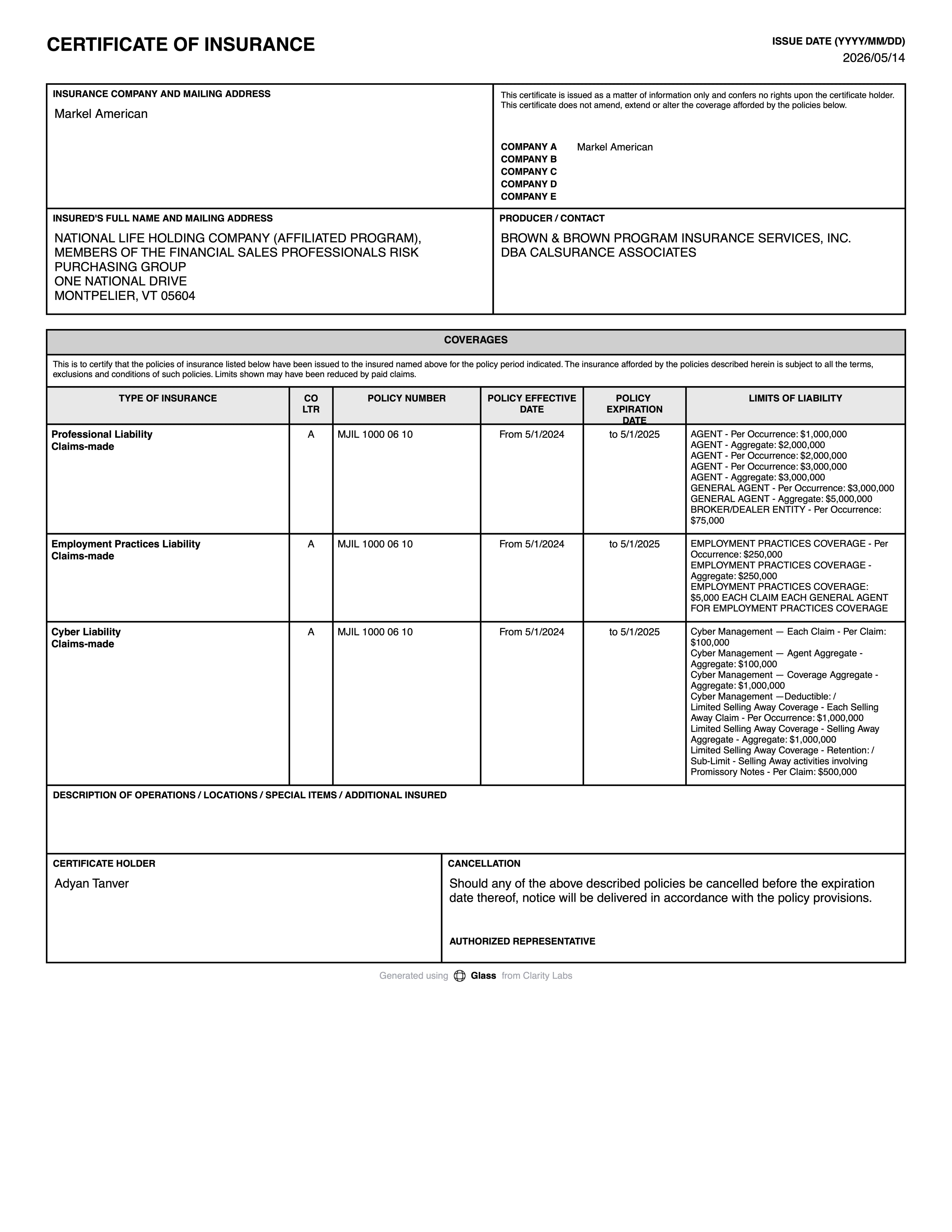
Certificate of insurance

Juniper Consulting

Ready for your review

Answer renewal reminders

Portals often chase new certificates as policies near expiry. Ask in Slack and we confirm your renewed policies are on file.

# spot-support

SamJuniper Consulting

Can you help prepare proof of our general liability insurance?

RileySpot

Let’s review the information and discuss the next steps with your broker.

What your certificate needs to show

  • 01

    General liability

    The baseline most supplier portals list, for injury and property damage.

  • 02

    Professional or tech E&O

    If you provide services, software or advice, cover for claims that your work cost the customer money.

  • 03

    Cyber liability

    If you’ll handle the customer’s data or connect to their systems.

  • 04

    Workers’ compensation and auto

    For employees who work on the customer’s premises or drive for the job.

  • 05

    The customer as additional insured

    Often on general liability, with the customer’s entities named as their contract names them.

Endorsements to check

  • 01

    Additional insured

    Adds the customer as an insured on your liability policy for claims arising from your work for them. The portal may reject a certificate that claims it without the endorsement.

  • 02

    Waiver of subrogation

    If the customer’s terms ask for it, your insurer agrees not to pursue them to recover a claim payment. Your Spot team arranges it with your broker and insurer.

Generate your certificate in Spot

  • 01

    Select your policies

    Choose the policies the portal asks to see from those in your Spot workspace.

  • 02

    Enter the customer’s details

    Add the customer’s legal entity and address as certificate holder, exactly as the portal or contract shows them.

  • 03

    Add the portal’s requirements

    Upload the requirements or list them, including any wording the customer wants in the description.

  • 04

    Review and download

    Check that every required line and limit appears, then download the certificate to upload to the portal.

Mistakes to avoid

  • 01

    Using a parent or trade name

    Portals match the certificate holder to the entity you contract with. A brand or parent company name can fail the check.

  • 02

    Missing a line the portal requires

    If the portal asks for cyber or E&O and you don’t carry it, the certificate can’t fix that. Get the coverage first.

  • 03

    Letting it expire in the portal

    When your policy renews, upload a new certificate, or payments and onboarding can stall.

Coverage to consider

  • General liability

    Buy general liability with Spot: we prepare your submission, compare broker proposals on limits and terms, and get certificates and endorsements ready.

    Explore coverage
  • Professional errors and omissions (E&O)

    Buy professional liability (E&O) with Spot: a prepared submission, proposals compared on scheduled services, claims-made terms and defense, and certificates handled.

    Explore coverage
  • Technology errors and omissions (E&O)

    Tech E&O with Spot for software, hosting and integration companies: every service described, contracts read against proposals, and certificates for customers.

    Explore coverage
  • Cyber liability

    Buy cyber insurance with Spot: we describe your systems and controls for insurers, compare response and liability limits, and check customer cyber clauses.

    Explore coverage
  • Workers’ compensation

    Workers’ compensation with Spot: state requirements checked, payroll and job classifications described correctly, and broker proposals compared before you bind.

    Explore coverage
  • Commercial auto

    Commercial auto with Spot: one submission for your vehicles and drivers, and proposals compared on liability, vehicle damage, deductibles and who’s covered.

    Explore coverage

Common questions

Who fills in the certificate for the portal?

You do, in the Spot app, from the policies in your Spot workspace. Your Spot team is there if the request asks for something your policies don’t have.

The portal says my certificate is non-compliant. What does that mean?

Usually a limit, coverage or endorsement doesn’t match the requirement. Send the notice to your Spot team, and we’ll tell you whether the policy or the certificate needs to change.

Can a certificate add coverage the customer requires?

No. It only shows what your policies provide. Missing coverage has to be bought, and endorsements added to the policy through your broker and insurer.

Does Spot charge commissions on the coverage I add?

No. Spot takes no commissions on premiums and works alongside your broker.

Get insurance off your to-do list.

When a new customer’s supplier portal asks for proof of insurance, generate the certificate in the Spot app, and your Spot team closes any gaps first.

Learn more about certificates of insurance

Read these before you choose a policy or an insurer.